---
layout: post
title: "Crawling every Debian .deb package in history from snapshot.debian.org, learning the .deb format, and finding rate-limiting bypasses"
tags: [data_scraping, linux, security, programming]
description: "A deep dive into crawling snapshot.debian.org for historical .deb packages. Learn about the .deb format and techniques to bypass rate limits using IPv6."
---
Some time ago, I had the idea of collecting all of the `md5sums` files for every published Debian package in history, and publishing them online in a single repository to be easily queryable. `md5sums` files contains a list of MD5 checksums for each file a Debian package installs. For example, the Debian package `libdrm-amdgpu1_2.4.104-1~bpo10%2B1_amd64.deb` contains a "control archive" file, `control.tar.gz`, that contains files containing metadata, including a file called `md5sums`:
```
4e6086fcac77ebd8e2490080c230c727 usr/lib/x86_64-linux-gnu/libdrm_amdgpu.so.1.0.0
c849240549cec042232213d26c8b5789 usr/share/doc/libdrm-amdgpu1/changelog.Debian.gz
f877b409d7f2dfcf6e3e2a139d19798c usr/share/doc/libdrm-amdgpu1/copyright
```
Generally, when a Debian package is installed, its `md5sums` file is installed in `/var/lib/dpkg/info/[package_name].md5sums`.
Although [deb-md5sums(5)](https://manpages.debian.org/testing/dpkg-dev/deb-md5sums.5.en.html) notes that "_This file is used for integrity verification and deduplication purposes, and not for any kind of security purpose._", some security tools, like [Lynis](https://cisofy.com/lynis/), do use these files for integrity checks with [debsums(1)](https://manpages.ubuntu.com/manpages/trusty/man1/debsums.1.html).
The problem with this approach is that the `md5sums` files can simply be edited on the host, and there is no "trusted third-party" which can verify the integrity of the `md5sums` files themselves. Likewise, the normal Debian package repository does not include every Debian package's `.deb` file in history, meaning if you have an OS running an older version, it is not possible to download the `.deb` file again from the normal Debian repositories (in order to retrieve the proper `md5sums` file for the installed package). So, I thought I might find a way to download every Debian `.deb` file published in history, and collate their `md5sums` files. This post details the second attempt at this, which I ultimately didn't completely finish; I'm unsure if collecting these files actually solves any problem anymore, so I didn't pursue it further.
The source code of what I _did_ create is on [my GitHub](https://github.com/MegaManSec/md5sums). Use it at your own risk; it worked for me but YMMV.
## Debian Package Archive
---
Debian provides a comprehensive archive of published packages at [https://snapshot.debian.org/](https://snapshot.debian.org/), dating all the way back to March, 2005. Daily (and sometimes more often) snapshots include all of the packages ever published, and can act as drop-ins for the normal Debian archives:
```
https://snapshot.debian.org/archive/debian/ shows that we have imports for the main Debian archive, http://ftp.debian.org/debian/, from 2005 until the present. Picking October of 2009, https://snapshot.debian.org/archive/debian/?year=2009;month=10, provides us with a list of many different states of the debian archive, roughly spaced 6 hours apart (the update frequency of ftp.debian.org at that time). Following any of these links, say https://snapshot.debian.org/archive/debian/20091004T111800Z/, shows how `ftp.debian.org/debian` looked on the 4th of October 2009 at around 11:18 UTC.
If you want to add a specific date's archive to your apt `sources.list` simply add an entry like these:
deb https://snapshot.debian.org/archive/debian/20091004T111800Z/ lenny main
deb-src https://snapshot.debian.org/archive/debian/20091004T111800Z/ lenny main
deb https://snapshot.debian.org/archive/debian-security/20091004T121501Z/ lenny/updates main
deb-src https://snapshot.debian.org/archive/debian-security/20091004T121501Z/ lenny/updates main
```
A list of each package ever can be found by searching each category. For example, [https://snapshot.debian.org/package/?cat=t](https://snapshot.debian.org/package/?cat=t) will find all packages that have ever been published beginning with the letter `t`.
If, for example, we wanted to find the `.deb` packages for `tmux(1)` that were available on September 3, 2017, we can navigate to [https://snapshot.debian.org/archive/debian/20170903T215859Z/pool/main/t/tmux/](https://snapshot.debian.org/archive/debian/20170903T215859Z/pool/main/t/tmux/) and see the various versions that were available at the time. https://snapshot.debian.org/archive/debian/20240901T024950Z/pool/main/t/tmux/ would show what is available today (September 26, 2024).
We can also do a reverse-lookup, based on the package. Looking up `tmux` at [https://snapshot.debian.org/binary/tmux/](https://snapshot.debian.org/binary/tmux/), we can then find all of the versions ever published: from `3.5~git20240823-2`, all the way to `0.8-4`. Then, on [https://snapshot.debian.org/binary/tmux/0.8-4/](https://snapshot.debian.org/binary/tmux/0.8-4/), we can find all of the `.deb` files for this version (for SPARC, powerpc, amd64, i386, and so on).
With this information, we can create a script which will download each of the Debian packages. Hopefully.
### List of Debian packages
---
The first step is to parse each of the categories from the snapshot homepage. This is easy enough:
```python
def get_all_categories():
resp = get_page('http://snapshot.debian.org')
return re.findall(r'binary/\?cat=(['+letters+']+)', resp.text)
```
The following categories exist:
```
0 1 2 3 4 6 7 8 9 C a b c d e f g h i j k l lib+ lib- lib0 lib2 lib3 lib4 lib6 liba libb libc libd libe libf libg libh libi libj libk libl libm libn libo libp libq libr libs libt libu libv libw libx liby libz m n o p q r s t u v w x y z
```
So we can just condense this down to `letters = "012346789Cabcdefghijklmnopqrstuvwxyz+-"`. Note that `C`. That corresponds to just a single package: [https://snapshot.debian.org/binary/CGI-modules/](https://snapshot.debian.org/binary/CGI-modules/). Looks like it shouldn't even be there, and is associated with a really old version [of Perl](https://lists.debian.org/debian-devel/1997/06/msg00615.html).
Next, we loop over the categories, retrieve each page, and parse the list of packages in each category:
```python
url = f"http://snapshot.debian.org/binary/?cat={category}"
resp = get_page(url)
soup = BeautifulSoup(resp.content, "html.parser")
p_tag = soup.find("p")
packages = p_tag.find_all("a")
for package in packages:
package_name = package.text
package_url = f"http://snapshot.debian.org/mr/binary/{package_name}/"
```
### List of package versions
---
`http://snapshot.debian.org/mr/binary/{package_name}` can be used to retrieve a JSON representation of the list of all of the versions for a package. For example from [https://snapshot.debian.org/mr/binary/tmux/](https://snapshot.debian.org/mr/binary/tmux/):
```json
{"_comment":"foo","binary":"tmux","result":
[
{"binary_version":"3.5~git20240823-2","name":"tmux","source":"tmux","version":"3.5~git20240823-2"},
{"binary_version":"3.5~git20240823-1","name":"tmux","source":"tmux","version":"3.5~git20240823-1"},
{"binary_version":"0.8-4","name":"tmux","source":"tmux","version":"0.8-4"}
]
}
```
### List of package architectures available
---
With each of the versions, we next need to retrieve `http://snapshot.debian.org/mr/binary/{name}/{binary_version}/binfiles?fileinfo=1`. This retrieves a list of individual packages for the version of the package. For example from [https://snapshot.debian.org/mr/binary/tmux/0.8-4/binfiles?fileinfo=1](https://snapshot.debian.org/mr/binary/tmux/0.8-4/binfiles?fileinfo=1):
```json
{
"_comment": "foo",
"binary": "tmux",
"binary_version": "0.8-4",
"fileinfo": {
"063d88a01438cd449b675d7eb4900b8ef176bd14": [
{
"archive_name": "debian",
"first_seen": "20090518T042230Z",
"name": "tmux_0.8-4_sparc.deb",
"path": "/pool/main/t/tmux",
"size": 131212
}
],
...
"f50c762eec54d3b927cad5d7dd4a39510c9e054a": [
{
"archive_name": "debian",
"first_seen": "20090518T042230Z",
"name": "tmux_0.8-4_amd64.deb",
"path": "/pool/main/t/tmux",
"size": 150126
}
]
},
....
}
```
With this, we have the following information:
- archive_name: The type of Debian archive (e.g. `debian`, `debian-backports`, `debian-archive`, etc),
- first_seen: The datetime when a package's version was first seen (e.g. `20091004T111800Z`),
- path: The pool (e.g. `main`, `non-free`, etc) and package name the package is located,
- file_name: The filename (e.g. `tmux_0.8-4_amd64.deb`).
Each `.deb` file can then be downloaded, e.g. from [https://snapshot.debian.org/archive/debian/20090518T042230Z/pool/main/t/tmux/tmux_0.8-4_sparc.deb](https://snapshot.debian.org/archive/debian/20090518T042230Z/pool/main/t/tmux/tmux_0.8-4_sparc.deb) and [https://snapshot.debian.org/archive/debian/20090518T042230Z/pool/main/t/tmux/tmux_0.8-4_amd64.deb](https://snapshot.debian.org/archive/debian/20090518T042230Z/pool/main/t/tmux/tmux_0.8-4_amd64.deb).
### Get and handle binfile
---
With the retrieved information, it is possible to reconstruct a download link for each architecture automatically, for each version of the package:
```python
binfile_url = f"http://snapshot.debian.org/mr/binary/{name}/{binary_version}/binfiles?fileinfo=1"
response = get_page(binfile_url)
data = json.loads(response.content)
fileinfo = data["fileinfo"]
urls = []
for file in fileinfo:
for file_data in fileinfo[file]:
first_seen = file_data["first_seen"]
path = file_data["path"]
file_name = file_data["name"]
archive_name = file_data["archive_name"]
url = f"archive/{archive_name}/{first_seen}{path}/{file_name}"
urls.append(url)
```
The `urls` list will then be something like:
```json
[
"archive/debian/20090517T221249Z/pool/main/t/tmux/tmux_0.8-4_i386.deb",
"archive/debian/20090518T042230Z/pool/main/t/tmux/tmux_0.8-4_amd64.deb",
"archive/debian/20090518T042230Z/pool/main/t/tmux/tmux_0.8-4_ia64.deb",
"archive/debian/20090518T042230Z/pool/main/t/tmux/tmux_0.8-4_sparc.deb",
"archive/debian/20090518T102036Z/pool/main/t/tmux/tmux_0.8-4_alpha.deb",
"archive/debian/20090518T154849Z/pool/main/t/tmux/tmux_0.8-4_armel.deb",
"archive/debian/20090518T221259Z/pool/main/t/tmux/tmux_0.8-4_s390.deb",
"archive/debian/20090521T042115Z/pool/main/t/tmux/tmux_0.8-4_mips.deb",
"archive/debian/20090524T041923Z/pool/main/t/tmux/tmux_0.8-4_mipsel.deb",
"archive/debian/20090530T160232Z/pool/main/t/tmux/tmux_0.8-4_powerpc.deb",
]
```
Seems easy enough, right? Surely we then just go and do this:
```python
for url in urls:
get_and_parse_deb_url(f"http://snapshot.debian.org/{url}");
```
This is semi-structured mass crawling, so of course not!
### Crawling Debian's .deb archive
---
First, let's recap a bit.
In "[List of package versions](#list-of-package-versions)", we were able to retrieve a list of each version of a package. We had `package_name`, and could retrieve a list of versions as `binary_version`. We should store this information somewhere for future use. So, when a certain version of a package has been completely downloaded (i.e. all architectural versions of a specific numerical version), we add to a database (for example):
Remember: For each `package_name` and `binary_version`, there is another set of `.deb` files to be downloaded, each which have been built on different architectures. Once all of the individual files (retrieved in "[List of package architectures available](#list-of-package-architectures-available)" are downloaded, we can note this in a database:
```sql
insert into downloaded_versions(package_name, version) values ('tmux', '0.8-4');
```
This means we can save a lot of time and bandwidth on any script re-run:
```python
with connection.cursor() as cursor:
cursor.execute('SELECT 1 from downloaded_versions WHERE package_name = %s AND version = %s', (package_name, binary_version))
result = cursor.fetchone()
if result: # We do not need to download anything more for the package 'package_name' and version 'binary_version'
continue
```
---
When a `http://snapshot.debian.org/mr/binary/{name}/{binary_version}/binfiles?fileinfo=1` is retrieved and the list of files for a version of a package is made available, we could simply store each the locations for each architectural version, and remove each link from the database as they are downloaded. This could be useful if for example, `https://snapshot.debian.org/mr/binary/tmux/0.8-4/binfiles?fileinfo=1` is retrieved but not all of the architectural version files can be downloaded for some reason -- then, on the next run, the script could notice attempt to retrieve the list of URLs from the database, instead of retrieving the list via HTTP (more on why this is important soon).
So, looping over every `package_name` (AKA `name`) and `binary_version` combination retrieved, we do the following:
```python
def handle_package(package_name, binary_version):
for package_name, binary_version:
urls = []
finished_urls = 0
with connection.cursor() as cursor:
cursor.execute('SELECT 1 from downloaded_versions WHERE package_name = %s AND version = %s', (package_name, binary_version))
result = cursor.fetchone()
if result: # We do not need to download anything more for the package 'package_name' and version 'binary_version'
continue
# We haven't completely downloaded version 'binary_version' for the package 'package_name'
# Have we partially downloaded the architectural versions?
# If we have any urls in the 'binfiles' table for package_name = package_name and version = binary_version, we will skip fetching the /binfiles link and just continue with the previously retrieved urls
cursor.execute('SELECT url from binfiles WHERE package_name = %s AND version = %s', (package_name, binary_version))
result = cursor.fetchall()
for row in result:
urls.append(row[0])
# Already downloaded /binfiles, need to finish retrieving some architectural versions
if len(urls) > 0:
for url in urls:
if get_and_parse_deb_url(f"http://snapshot.debian.org/{url}"):
finished_urls += 1
cursor.execute('DELETE FROM binfiles WHERE url = %s AND package_name = %s AND version = %s', (url, package_name, binary_version))
else:
# We have (probably) never tried to download this version of the package before. Retrieve http://snapshot.debian.org/mr/binary/{name}/{binary_version}/binfiles?fileinfo=1, get each URL, add it to the database, and then attempt to retrieve each.
# get_and_handle_binfile() should return a list of URLs in the format of "archive/{archive_name}/{first_seen}{path}/{file_name}" which can be downloaded e.g. f"http://snapshot.debian.org/{url}"
urls = get_and_handle_binfile(package_name, binary_version)
for url in urls:
if get_and_parse_deb_url(f"http://snapshot.debian.org/{url}"): # get_and_parse
finished_urls += 1
else:
cursor.execute('INSERT INTO binfiles (package_name, version, url) VALUES (%s, %s, %s)', (package_name, binary_version, url)) # Couldn't download the URL for some reason, save it in the database
# If we have succesfully gotten and parsed every .deb file, we can add the package_name and version to the 'downloaded_versions' table, so it's never downloaded again.
if finished_urls == len(urls):
cursor.execute('INSERT INTO downloaded_versions (package_name, version) VALUES (%s, %s)', (package_name, binary_version));
```
In the above example, `get_and_handle_binfile()` will do something like [mentioned before](#get-and-handle-binfile) and return a list of URLs. Error handling is missing from the above example (e.g. if `get_and_handle_binfile()` fails, `finished_urls` could probably be set to `-1`).
I didn't completely implement the above: on a re-run, the `/binfiles` link would always be retrieved unless all of the architectural versions had already been downloaded (i.e. the `binfiles` table did not exist, but `downloaded_versions` did).
### Retrieving md5sums files
---
So how about retrieving the `.deb` file, extracting the control archive, and then extracting the `md5sums` file, AKA what `get_and_parse_deb_url()` should do? Well, that's where the fun really begins.
We have multiple problems to solve:
1. How do we download millions (probably) of `.deb` files without using a ton of unecessary bandwidth?
2. How do we download millions (probably) of `.deb` files without being rate-limited?
### What's in a .deb file, anyway?
---
The deb file format consists of three compressed data structures, across three sections: "_package section_", "_control section_", and "_data section_". The package and control sections begin with fixed-length metadata: 132-bytes in total. Each section of the metadata use pre-defined lengths. So, we can parse: `file identifier` and `file size in bytes`, by specifically retrieving bytes `73-88` and `121-130` respectively. For example:
```bash
$ head -c132 tmux_0.8-4_sparc.deb | dd bs=1 skip=72 count=16 2>/dev/null |sed -n l
control.tar.gz $
head -c132 tmux_0.8-4_sparc.deb | dd bs=1 skip=120 count=10 2>/dev/null |sed -n l
1163 $
```
We can confirm:
```bash
$ ar x tmux_0.8-4_sparc.deb
$ wc -c control.tar.gz
1163 control.tar.gz
$ tar -xf control.tar.gz
$ cat md5sums
1301af8be964acab1ba7f856f8278786 usr/bin/tmux
65a460b4c43c9f05533b45925b888447 usr/share/man/man1/tmux.1.gz
5344d4af9e34c627f5d1950ca47ff3a3 usr/share/doc/tmux/changelog.gz
1c6a5815f6bb099909532f17a3dfbb62 usr/share/doc/tmux/TODO.gz
c6d8cfd9539b0eb816f61383f0348be6 usr/share/doc/tmux/FAQ.gz
42aa13e3777ded1c27778fe5ad26ca6a usr/share/doc/tmux/NOTES.gz
67e527785b335b0449c9a4e0f4ef736f usr/share/doc/tmux/examples/n-marriott.conf
4ba06444fa067d6753f5a5274b42353e usr/share/doc/tmux/examples/n-marriott.sh
2e997da8b83766eee8ce9237dba45b83 usr/share/doc/tmux/examples/tmux.vim
c0c366fb82d41e3c12827bbf65cde5d4 usr/share/doc/tmux/examples/screen-keys.conf
3da8eb165e28599dffe269410e7631cc usr/share/doc/tmux/copyright
26d656cd487da95e32eaa7f9cf4c05e8 usr/share/doc/tmux/changelog.Debian.gz
```
Wikipedia outlines the structure really well:
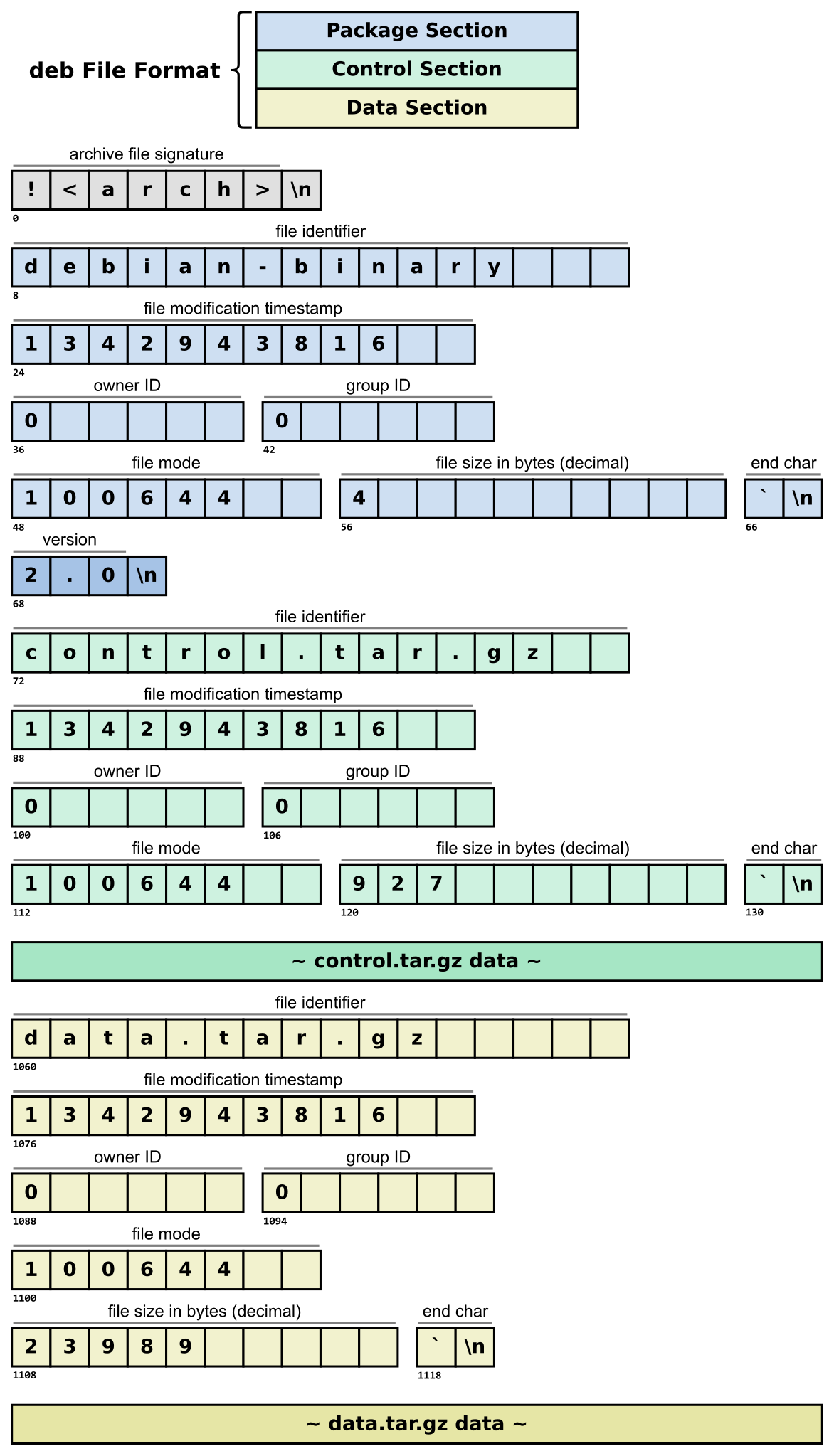 So, we don't need to download the full `.deb` file at all.
First, we need to find out the size of `control.tar.gz`, then download that-many bytes (plus the metadata):
```python
def download_deb_file(url):
s = requests.Session()
try:
s.headers = {
'User-Agent': "Mozilla/5.0 (Macintosh; Intel Mac OS X 10.15; rv:109.0) Gecko/20100101 Firefox/116.0",
"Range": "bytes=%u-%u" % (72, 129)
}
response = s.get(url, timeout=15)
if response.status_code not 206 or len(response.content) != 58
return False
start = 132 # 132-bytes of metadata
control_name = response.content[0:16].rstrip()
control_size = int(response.content[48:58])
end = control_size + start
s.headers = {
'User-Agent': "Mozilla/5.0 (Macintosh; Intel Mac OS X 10.15; rv:109.0) Gecko/20100101 Firefox/116.0",
"Range": "bytes=%u-%u" % (start, end)
}
response = s.get(url, timeout=45)
if response.status_code not in [200, 206]:
return False
return [control_name, response.content]
return False
```
`response.content`, which has the filename `control_name`, will contain the compressed control data.
Great, so now we're only downloading the control data archive and completely skipping the actual binary / installation data -- which could be gigabytes per architectural version.
### Extracting the control archive data
---
Next, we need to extract the control data. Three types of control data archive formats are used: `control.tar.gz`, `control.tar.xz`, and `control.tar.zst`.
I forgot to log when an unexpected filename was found in the metadata, which could have been interesting. In various packages, tar files which could not be decompressed were discovered, though (which I did not research further). In some cases, the `.deb` files either had missing bytes, or simply didn't exist at all, despite being referenced.
[tarfile](https://docs.python.org/3/library/tarfile.html) can decompress the first of these two (gzip and xz), but can't handle zstandard. So, if we encounter a `.zst` file, we extract it using [zstandard](https://pypi.org/project/zstandard/), then `tarfile` will deal, since it will be in pure tar archive format:
```python
def extract_control_tar(deb_data):
tar_data = deb_data[1]
if deb_data[0] == b'control.tar.zst': # tarfile does not support zstd, so unpack manually. not necessary for control.tar.gz or control.tar.xz
dctx = zstd.ZstdDecompressor()
stream_reader = dctx.stream_reader(deb_data[1])
tar_data = stream_reader.read()
stream_reader.close()
if tar_data:
tar_data = io.BytesIO(tar_data)
return tar_data
```
### Extracting the md5sums file
---
With that `tar_data`, we then extract the md5sums data:
```python
def extract_md5sums_file(tar_data):
md5sums_data = "TAR_ERROR".encode()
try:
with tarfile.open(fileobj=tar_data, mode='r:*') as tar:
md5sums_data = "TAR_EMPTY".encode()
for member in tar.getmembers():
if member.name.endswith('md5sums'):
md5sums_data = tar.extractfile(member).read()
break
except tarfile.TarError:
pass
return md5sums_data
```
### Rate-limiting in Debian's Puppet Policy
---
How do we address the second question from [receiving md5sums files](#receiving-md5sums-files), "_How do we download millions (probably) of `.deb` files without being rate-limited?_"
Well, first we find out how the rate-limiting works! Taking a look at Debian's [Puppet policy for snapshot](https://salsa.debian.org/dsa-team/mirror/dsa-puppet/-/blob/production/modules/roles/manifests/snapshot_web.pp), we can see the following:
```
haproxy::frontend { 'snapshot':
mode => 'http',
bind => { '*:443,:::443' => ['tfo', 'ssl', 'crt', '/etc/dehydrated/private/snapshot.debian.org_fullchain_with_key.pem', 'strict-sni'] },
options => {
default_backend => 'snapshot',
option => [
# We rate-limit requests by clients.
# Currently, we do that at the netfilter level, so one
# request per connection works best.
'httpclose',
],
},
}
```
This isn't applicable to us, because we will connect using HTTP, not HTTPS. So then we look at:
```
# varnish cache
###############
ferm::rule { 'dsa-nat-snapshot-varnish-v4':
table => 'nat',
chain => 'PREROUTING',
rule => "proto tcp daddr ${ipv4addr} dport 80 REDIRECT to-ports 6081",
}
varnish::config { 'default':
listen => [
':6081',
"[${ipv6addr}]:80"
],
backend => 'file,/var/lib/varnish/varnish_storage.bin,8G',
content => template('roles/snapshot/snapshot.debian.org.vcl.erb'),
}
# the ipv6 port 80 is owned by varnish
file { '/etc/apache2/ports.conf':
content => @("EOF"),
Listen 0.0.0.0:80
Listen [${ipv6addr_apache}]:80
| EOF
require => Package['apache2'],
notify => Service['apache2'],
}
```
Basically:
1. IPv4 port 80 is redirected to port 6081 on PREROUTING
2. IPv4 port 6081 is managed by Varnish
3. IPv6 port 80 is managed by Varnish
4. IPv4 port 80 is managed by Apache
5. `ipv6addr_apache` port 80 is managed by Apache.
We learn from [snapshot.debian.org.vcl.erb](https://salsa.debian.org/dsa-team/mirror/dsa-puppet/-/blob/production/modules/roles/templates/snapshot/snapshot.debian.org.vcl.erb) that the backend of the Varnish server is `127.0.0.1:80` -- i.e. the Apache server. We also learn that Varnish will not allow keep-alive unless it's coming from HAproxy:
```
# We rate-limit requests by clients.
# Currently, we do that at the netfilter level, so one
# request per connection works best.
sub vcl_deliver {
if (remote.ip != "127.0.0.1" &&
remote.ip != "::1") {
set resp.http.connection = "close";
}
}
```
In [haproxy.cfg.erb](https://salsa.debian.org/dsa-team/mirror/dsa-puppet/-/blob/production/modules/roles/templates/snapshot/haproxy.cfg.erb), keep-alive is disallowed, too.
According to [sallinen.debian.org.yaml](https://salsa.debian.org/dsa-team/mirror/dsa-puppet/-/blob/production/data/nodes/sallinen.debian.org.yaml):
```
roles::snapshot_web::ipv4addr: '193.62.202.27'
roles::snapshot_web::ipv6addr: '2001:630:206:4000:1a1a:0:c13e:ca1b'
roles::snapshot_web::ipv6addr_apache: '2001:630:206:4000:1a1a:0:c13e:ca1a'
```
### Proxy fun
---
So, basically, things look like this:
- IPv4 on port 443: User -> HAproxy (193.62.202.27:443, drop http keepalive) -> Varnish (193.62.202.27:6081) -> Apache (127.0.0.1:80) -> wsgi.
- IPv6 on port 443: User -> HAproxy ([2001:630:206:4000:1a1a:0:c13e:ca1b]:443, drop http keepalive) -> Varnish (127.0.0.1:6081) -> Apache (127.0.0.1:80) -> wsgi.
- IPv4 on port 80 User -> Varnish (193.62.202.27:80, forward to 127.0.0.1:6081, drop http keepalive) -> Apache (127.0.0.1:80) -> wsgi.
- IPv6 on port 80: User -> Varnish ([2001:630:206:4000:1a1a:0:c13e:ca1b]:80, drop http keepalive) -> Apache (127.0.0.1:80) -> wsgi.
### Bypassing rate-limiting
---
There seems to be a hole in the above, though. It's impossible to connect directly to Apache with IPv4 (e.g. on port 80) because of the PREROUTING rule. But the IPv6 `ipv6addr_apache` address is sitting wide open on port 80, meaning we can directly interact with Apache -- which means our `Connection: keep-alive` will be honored, and we can bypass any network-based ratelimiting, as we can simply use a single connection to request multiple files:
```
$ curl -6 'snapshot.debian.org' -I 2>/dev/null|grep -i Via
Via: 1.1 varnish (Varnish/6.5)
$ curl -6 'https://snapshot.debian.org/' -I 2>/dev/null|grep -i Via
via: 1.1 varnish (Varnish/6.5)
$ curl -H 'Host: snapshot.debian.org' -I '[2001:630:206:4000:1a1a:0:c13e:ca1b]' 2>/dev/null | grep Via
Via: 1.1 varnish (Varnish/6.5)
$ curl -H 'Host: snapshot.debian.org' -I '[2001:630:206:4000:1a1a:0:c13e:ca1a]' 2>/dev/null
HTTP/1.1 200 OK
Date: Thu, 26 Sep 2024 20:05:57 GMT
Server: Apache
X-Content-Type-Options: nosniff
X-Frame-Options: sameorigin
Referrer-Policy: no-referrer
X-Xss-Protection: 1
Permissions-Policy: interest-cohort=()
Upgrade: h2,h2c
Connection: Upgrade
Content-Length: 20510
Cache-Control: max-age=600, public
Expires: Thu, 26 Sep 2024 20:15:58 GMT
Vary: Accept-Encoding
X-Clacks-Overhead: GNU Terry Pratchett
Content-Type: text/html; charset=utf-8
```
So, now we're directly communicating with the Apache server with no caching (and with no overhead from https!)
Why would we want to do this -- especially to skip Varnish cache? Well, there was extreme rate-limiting on snapshot.debian.org that applied to all connections -- having to open a new connection for every `.deb` file downloaded, we would quickly reach this limit. Let's test whether this actually works:
```
$ curl -H 'Connection: keep-alive' -H 'Host: snapshot.debian.org' -v 'http://[2001:630:206:4000:1a1a:0:c13e:ca1a]/archive/debian/20090518T042230Z/pool/main/t/tmux/tmux_0.8-4_amd64.deb' -o 1.deb 'http://[2001:630:206:4000:1a1a:0:c13e:ca1a]/archive/debian/20090518T042230Z/pool/main/t/tmux/tmux_0.8-4_amd64.deb' -o 2.deb
* Trying 2001:630:206:4000:1a1a:0:c13e:ca1a:80...
[..]
* Connected to 2001:630:206:4000:1a1a:0:c13e:ca1a (2001:630:206:4000:1a1a:0:c13e:ca1a) port 80 (#0)
[..]
* Connection #0 to host 2001:630:206:4000:1a1a:0:c13e:ca1a left intact
* Found bundle for host 2001:630:206:4000:1a1a:0:c13e:ca1a: 0x5e1a5b730bb0 [serially]
[..]
* Re-using existing connection! (#0) with host 2001:630:206:4000:1a1a:0:c13e:ca1a
* Connected to 2001:630:206:4000:1a1a:0:c13e:ca1a (2001:630:206:4000:1a1a:0:c13e:ca1a) port 80 (#0)
[..]
* Connection #0 to host 2001:630:206:4000:1a1a:0:c13e:ca1a left intact
[..]
```
Success! We requested two files and used the same connection!
So, our script will be connecting to `http://[2001:630:206:4000:1a1a:0:c13e:ca1a]/` directly with a `Host: snapshot.debian.org` header, and reuse connections. This also saves a bit on performance because we don't have to resolve the dns records for snapshot.debian.org, which [requests](https://pypi.org/project/requests/) seems to do on every connection (which should be cached by the local resolver).
----
... As it turns out, a month before writing this post, [rate limiting was removed from snapshot.debian.org](https://salsa.debian.org/dsa-team/mirror/dsa-puppet/-/commit/7d3463a55e4cc85dc798321f78fe4ccd9381a381) (there is also some default ratelimiting in [the apache2 puppet policy](https://salsa.debian.org/dsa-team/mirror/dsa-puppet/-/blob/production/modules/apache2/manifests/init.pp), but it's disabled by default).
Also, apparently since some time ago, the snapshot website redirects users to blobs at snapshot.debian.org when downloading some of the `.deb` files:
```bash
$ curl -I -H 'Range: bytes=0-131' -H 'Connection: keep-alive' -H 'Host: snapshot.debian.org' 'http://[2001:630:206:4000:1a1a:0:c13e:ca1a]/archive/debian/20090518T042230Z/pool/main/t/tmux/tmux_0.8-4_amd64.deb'
HTTP/1.1 302 FOUND
[..]
Location: http://snapshot.debian.org/file/f50c762eec54d3b927cad5d7dd4a39510c9e054a
```
So we need to ensure we don't follow the redirect but download the correct data using this round-about method of bypassing the rate-limiting. Thus, we can just set the following in `/etc/hosts`:
```
2001:630:206:4000:1a1a:0:c13e:ca1a snapshot.debian.org
```
### IPv6 fun
---
As I've mentioned before in [Credential Stuffing Done Right: Some Tips](https://joshua.hu/credential-stuffing-done-right) and [A RuneScape Hacker's Dream: An Authenticator and PIN Bypass](https://joshua.hu/runescape-bank-pin-exploit-bypass-username-enumeration-captchaless-login), IPv6 is a dream for crackers and the like looking to bypass captchas or IP-based ratelimiting. Need 4 billion ip addresses? Well, that's fewer than 50 Euros a month!
So that's what I also built into my script, too. _Why build one when you can build two at twice the price_" -- S.R.Hadden
In reality, much of the code discussed is not exactly the same as what I wrote. I actually wrote two Python scripts: one which handles retrieving the _list_ of URLs, and a separate one which actually downloads and extracts the md5sums data from those lists.
### Fetcher
---
One of the scripts which I call `fetcher`, ingests a list of URLs (in JSON) via HTTP using Flask:
```
$ curl localhost:8080 \
-H 'Content-Type: application/json' \
--data \
'{"urls": [
"archive/debian/20240901T024950Z/pool/main/libd/libdrm/libdrm-amdgpu1_2.4.122-1_amd64.deb",
"archive/debian/20120202T040408Z/pool/main/3/3dchess/3dchess_0.8.1-15_amd64.deb"
]}'
{
"archive/debian/20120202T040408Z/pool/main/3/3dchess/3dchess_0.8.1-15_amd64.deb": "6650875161c1ca7bd7dd7f6e48c4bcac usr/games/3Dc\nf94894e3a6feeabe17b5e6ad71d6f655 usr/share/menu/3dchess\n2e78411b31ae44022e238059fad5b139 usr/share/doc/3dchess/3Dc-rules.html\nfcdc75f3d0d3802137d034028b1009ea usr/share/doc/3dchess/changelog.gz\ned7616c853e841a8f6ee970dabd02f30 usr/share/doc/3dchess/README\n8e903954d757702f8790d9c7a529dc6d usr/share/doc/3dchess/copyright\na299ce7452ccd2837ef5c0a14f64466b usr/share/doc/3dchess/TODO\n0cad7237e93c3c47bf96bb03ee8c23ac usr/share/doc/3dchess/changelog.Debian.gz\n2750302d8c9cd9ef54d01956570289c0 usr/share/doc/3dchess/ACKNOWLEDGEMENTS\n58c3a90ac129f3283aa510b124a6bed4 usr/share/man/man6/3Dc.6.gz\n90b2d22e8cbddee213f9f5918d767295 usr/share/applications/3dchess.desktop\n",
"archive/debian/20240901T024950Z/pool/main/libd/libdrm/libdrm-amdgpu1_2.4.122-1_amd64.deb": "cd58a035a87dd88e0f5a1ae71e2cf87c usr/lib/x86_64-linux-gnu/libdrm_amdgpu.so.1.0.0\n2b0a00e80612b08ba6ccc543eca9fd8f usr/share/doc/libdrm-amdgpu1/changelog.Debian.gz\nf877b409d7f2dfcf6e3e2a139d19798c usr/share/doc/libdrm-amdgpu1/copyright\n"
}
```
This script contains the `download_deb_file()`, `extract_control_tar()`, `extract_md5sums_file()`, and other functions.
The Flask endpoint is really simple:
```python
@app.route("/", methods=['POST'])
def get_md5sums_files():
urls = request.get_json()["urls"]
results = {}
for url in urls:
start = time.time()
current_interface = decide_interface()
deb_data = download_deb_file(sessions[current_interface]['session'], f"{BASE_URL}/{url}")
sessions[current_interface]['busy'] = False
end = time.time()
if not deb_data:
results[url] = "DEB_ERROR"
print(f"{end-start} for {url}: {results[url]}")
continue
tar_data = extract_control_tar(deb_data)
if not tar_data:
results[url] = "CONTROL_ERROR"
print(f"{end-start} for {url}: {results[url]}")
continue
tar_data.seek(0)
md5sums_data = extract_md5sums_file(tar_data)
if md5sums_data.decode("utf-8") in ("TAR_EMPTY", "TAR_ERROR"):
print(f"{end-start} for {url}: {md5sums_data.decode('utf-8')}")
else:
print(f"{end-start} for {url}")
results[url] = md5sums_data.decode("utf-8")
return jsonify(results)
```
These two lines are of note here:
```python
current_interface = decide_interface()
deb_data = download_deb_file(sessions[current_interface]['session']
```
At the beginning of the script, a list of addresses that the server can use (which my Hetzner server currently has 18,000,000,000,000,000,000) is specified, and a [requests](https://pypi.org/project/requests/) session is created for each one. Fetcher is multi-threaded, so some locking of is required to ensure that a request to snapshot.debian.org (or the IPv6 address) doesn't use an address already-in-use source address:
```python
srcs = [] # List of network addresses, e.g. ["10.0.0.1", "10.0.0.2", ... ] or ["2603:c020:8010:977e:886c:1528:26c2:d3d7", ... ]
# Or:
# subnet = ipaddress.ip_network("10.0.0.0/24")
# srcs = list(subnet.hosts())
sessions = []
for i in range(len(srcs)):
sessions.append({
'session': requests.Session(),
'last_refresh_time': time.time(),
'interface': srcs[i],
'busy': False,
})
total_requests = 0
session_lock = threading.Lock()
[..]
def decide_interface():
global total_requests
current_interface = total_requests % len(sessions)
random.shuffle(sessions)
# Use lock to prevent race condition when checking 'busy' and when starting to use a session
with session_lock:
refresh_session_if_needed(sessions[current_interface])
while sessions[current_interface]['busy']:
current_interface = (current_interface + 1) % len(sessions)
refresh_session_if_needed(sessions[current_interface])
total_requests += 1
sessions[current_interface]['busy'] = True
return current_interface
def refresh_session_if_needed(session_data):
interface = session_data['interface']
session = session_data['session']
current_time = time.time()
if current_time - session_data['last_refresh_time'] >= 600:
session.close()
session = requests.Session()
session_data['busy'] = False
session_data['last_refresh_time'] = time.time()
session.verify = True
src_ip = source.SourceAddressAdapter(interface, max_retries=1)
session.mount('http://', src_ip)
```
So when deciding which source address to use, fetcher will never use a source address that is already-in-use. If there are no not-in-use addresses, the lock will prevent the re-use of addresses.
### Runner
---
The main script, _runner_, handles the retrieval of the _lists_ of `.deb` files to be downloaded as discussed before, except instead of processing each `.deb` file individually, it sends a request to a fetcher with a list of `.deb` files to retrieve. It then loops over the results, and handles
```python
def get_hash(urls):
for url in urls.copy():
save_location = prepare_save_path(url)
if os.path.isfile(save_location):
urls.remove(url)
if len(urls) == 0:
return True
fetcher = random.choice(fetcher_urls)
data = json.dumps({"urls": urls})
try:
s = requests.Session()
retries = Retry(read=3, total=3, backoff_factor=15)
s.mount('http://', HTTPAdapter(max_retries=retries))
response = s.post(fetcher, headers={'Content-Type': 'application/json'}, data=data, timeout=180)
except Exception as e:
print(f"Something went extremely wrong (probably timeout) for {urls} using {fetcher}: {e}.")
return False
if response.status_code != 200:
print(f"Something went really wrong for {urls} using {fetcher}: {response.content}.")
return False
data = response.json()
written = 0
for url, md5sums_data in data.items():
if md5sums_data == 'DEB_ERROR':
continue
if md5sums_data == 'CONTROL_ERROR':
continue
if md5sums_data == 'TAR_ERROR':
continue
save_location = prepare_save_path(url)
os.makedirs(os.path.dirname(save_location), exist_ok=True)
with open(save_location, 'wb') as f:
written += 1
if md5sums_data == 'TAR_EMPTY':
continue
else:
f.write(md5sums_data.encode('utf-8'))
return len(urls) == written
```
The caller of the function handles the insert into the database (note: as mentioned, I did not implement the `binfiles` table, hence why no action is taken when an error is noticed in `md5sums_data`). The caller will also not call the function with a list containing a url which has already been downloaded (aka exists on the filesystem already).
A mistake I made was using the filesystem, which ran out of inodes fairly quickly. Instead, I should also store the results in a database.
Anyways, when running the script, the output like this:
So, we don't need to download the full `.deb` file at all.
First, we need to find out the size of `control.tar.gz`, then download that-many bytes (plus the metadata):
```python
def download_deb_file(url):
s = requests.Session()
try:
s.headers = {
'User-Agent': "Mozilla/5.0 (Macintosh; Intel Mac OS X 10.15; rv:109.0) Gecko/20100101 Firefox/116.0",
"Range": "bytes=%u-%u" % (72, 129)
}
response = s.get(url, timeout=15)
if response.status_code not 206 or len(response.content) != 58
return False
start = 132 # 132-bytes of metadata
control_name = response.content[0:16].rstrip()
control_size = int(response.content[48:58])
end = control_size + start
s.headers = {
'User-Agent': "Mozilla/5.0 (Macintosh; Intel Mac OS X 10.15; rv:109.0) Gecko/20100101 Firefox/116.0",
"Range": "bytes=%u-%u" % (start, end)
}
response = s.get(url, timeout=45)
if response.status_code not in [200, 206]:
return False
return [control_name, response.content]
return False
```
`response.content`, which has the filename `control_name`, will contain the compressed control data.
Great, so now we're only downloading the control data archive and completely skipping the actual binary / installation data -- which could be gigabytes per architectural version.
### Extracting the control archive data
---
Next, we need to extract the control data. Three types of control data archive formats are used: `control.tar.gz`, `control.tar.xz`, and `control.tar.zst`.
I forgot to log when an unexpected filename was found in the metadata, which could have been interesting. In various packages, tar files which could not be decompressed were discovered, though (which I did not research further). In some cases, the `.deb` files either had missing bytes, or simply didn't exist at all, despite being referenced.
[tarfile](https://docs.python.org/3/library/tarfile.html) can decompress the first of these two (gzip and xz), but can't handle zstandard. So, if we encounter a `.zst` file, we extract it using [zstandard](https://pypi.org/project/zstandard/), then `tarfile` will deal, since it will be in pure tar archive format:
```python
def extract_control_tar(deb_data):
tar_data = deb_data[1]
if deb_data[0] == b'control.tar.zst': # tarfile does not support zstd, so unpack manually. not necessary for control.tar.gz or control.tar.xz
dctx = zstd.ZstdDecompressor()
stream_reader = dctx.stream_reader(deb_data[1])
tar_data = stream_reader.read()
stream_reader.close()
if tar_data:
tar_data = io.BytesIO(tar_data)
return tar_data
```
### Extracting the md5sums file
---
With that `tar_data`, we then extract the md5sums data:
```python
def extract_md5sums_file(tar_data):
md5sums_data = "TAR_ERROR".encode()
try:
with tarfile.open(fileobj=tar_data, mode='r:*') as tar:
md5sums_data = "TAR_EMPTY".encode()
for member in tar.getmembers():
if member.name.endswith('md5sums'):
md5sums_data = tar.extractfile(member).read()
break
except tarfile.TarError:
pass
return md5sums_data
```
### Rate-limiting in Debian's Puppet Policy
---
How do we address the second question from [receiving md5sums files](#receiving-md5sums-files), "_How do we download millions (probably) of `.deb` files without being rate-limited?_"
Well, first we find out how the rate-limiting works! Taking a look at Debian's [Puppet policy for snapshot](https://salsa.debian.org/dsa-team/mirror/dsa-puppet/-/blob/production/modules/roles/manifests/snapshot_web.pp), we can see the following:
```
haproxy::frontend { 'snapshot':
mode => 'http',
bind => { '*:443,:::443' => ['tfo', 'ssl', 'crt', '/etc/dehydrated/private/snapshot.debian.org_fullchain_with_key.pem', 'strict-sni'] },
options => {
default_backend => 'snapshot',
option => [
# We rate-limit requests by clients.
# Currently, we do that at the netfilter level, so one
# request per connection works best.
'httpclose',
],
},
}
```
This isn't applicable to us, because we will connect using HTTP, not HTTPS. So then we look at:
```
# varnish cache
###############
ferm::rule { 'dsa-nat-snapshot-varnish-v4':
table => 'nat',
chain => 'PREROUTING',
rule => "proto tcp daddr ${ipv4addr} dport 80 REDIRECT to-ports 6081",
}
varnish::config { 'default':
listen => [
':6081',
"[${ipv6addr}]:80"
],
backend => 'file,/var/lib/varnish/varnish_storage.bin,8G',
content => template('roles/snapshot/snapshot.debian.org.vcl.erb'),
}
# the ipv6 port 80 is owned by varnish
file { '/etc/apache2/ports.conf':
content => @("EOF"),
Listen 0.0.0.0:80
Listen [${ipv6addr_apache}]:80
| EOF
require => Package['apache2'],
notify => Service['apache2'],
}
```
Basically:
1. IPv4 port 80 is redirected to port 6081 on PREROUTING
2. IPv4 port 6081 is managed by Varnish
3. IPv6 port 80 is managed by Varnish
4. IPv4 port 80 is managed by Apache
5. `ipv6addr_apache` port 80 is managed by Apache.
We learn from [snapshot.debian.org.vcl.erb](https://salsa.debian.org/dsa-team/mirror/dsa-puppet/-/blob/production/modules/roles/templates/snapshot/snapshot.debian.org.vcl.erb) that the backend of the Varnish server is `127.0.0.1:80` -- i.e. the Apache server. We also learn that Varnish will not allow keep-alive unless it's coming from HAproxy:
```
# We rate-limit requests by clients.
# Currently, we do that at the netfilter level, so one
# request per connection works best.
sub vcl_deliver {
if (remote.ip != "127.0.0.1" &&
remote.ip != "::1") {
set resp.http.connection = "close";
}
}
```
In [haproxy.cfg.erb](https://salsa.debian.org/dsa-team/mirror/dsa-puppet/-/blob/production/modules/roles/templates/snapshot/haproxy.cfg.erb), keep-alive is disallowed, too.
According to [sallinen.debian.org.yaml](https://salsa.debian.org/dsa-team/mirror/dsa-puppet/-/blob/production/data/nodes/sallinen.debian.org.yaml):
```
roles::snapshot_web::ipv4addr: '193.62.202.27'
roles::snapshot_web::ipv6addr: '2001:630:206:4000:1a1a:0:c13e:ca1b'
roles::snapshot_web::ipv6addr_apache: '2001:630:206:4000:1a1a:0:c13e:ca1a'
```
### Proxy fun
---
So, basically, things look like this:
- IPv4 on port 443: User -> HAproxy (193.62.202.27:443, drop http keepalive) -> Varnish (193.62.202.27:6081) -> Apache (127.0.0.1:80) -> wsgi.
- IPv6 on port 443: User -> HAproxy ([2001:630:206:4000:1a1a:0:c13e:ca1b]:443, drop http keepalive) -> Varnish (127.0.0.1:6081) -> Apache (127.0.0.1:80) -> wsgi.
- IPv4 on port 80 User -> Varnish (193.62.202.27:80, forward to 127.0.0.1:6081, drop http keepalive) -> Apache (127.0.0.1:80) -> wsgi.
- IPv6 on port 80: User -> Varnish ([2001:630:206:4000:1a1a:0:c13e:ca1b]:80, drop http keepalive) -> Apache (127.0.0.1:80) -> wsgi.
### Bypassing rate-limiting
---
There seems to be a hole in the above, though. It's impossible to connect directly to Apache with IPv4 (e.g. on port 80) because of the PREROUTING rule. But the IPv6 `ipv6addr_apache` address is sitting wide open on port 80, meaning we can directly interact with Apache -- which means our `Connection: keep-alive` will be honored, and we can bypass any network-based ratelimiting, as we can simply use a single connection to request multiple files:
```
$ curl -6 'snapshot.debian.org' -I 2>/dev/null|grep -i Via
Via: 1.1 varnish (Varnish/6.5)
$ curl -6 'https://snapshot.debian.org/' -I 2>/dev/null|grep -i Via
via: 1.1 varnish (Varnish/6.5)
$ curl -H 'Host: snapshot.debian.org' -I '[2001:630:206:4000:1a1a:0:c13e:ca1b]' 2>/dev/null | grep Via
Via: 1.1 varnish (Varnish/6.5)
$ curl -H 'Host: snapshot.debian.org' -I '[2001:630:206:4000:1a1a:0:c13e:ca1a]' 2>/dev/null
HTTP/1.1 200 OK
Date: Thu, 26 Sep 2024 20:05:57 GMT
Server: Apache
X-Content-Type-Options: nosniff
X-Frame-Options: sameorigin
Referrer-Policy: no-referrer
X-Xss-Protection: 1
Permissions-Policy: interest-cohort=()
Upgrade: h2,h2c
Connection: Upgrade
Content-Length: 20510
Cache-Control: max-age=600, public
Expires: Thu, 26 Sep 2024 20:15:58 GMT
Vary: Accept-Encoding
X-Clacks-Overhead: GNU Terry Pratchett
Content-Type: text/html; charset=utf-8
```
So, now we're directly communicating with the Apache server with no caching (and with no overhead from https!)
Why would we want to do this -- especially to skip Varnish cache? Well, there was extreme rate-limiting on snapshot.debian.org that applied to all connections -- having to open a new connection for every `.deb` file downloaded, we would quickly reach this limit. Let's test whether this actually works:
```
$ curl -H 'Connection: keep-alive' -H 'Host: snapshot.debian.org' -v 'http://[2001:630:206:4000:1a1a:0:c13e:ca1a]/archive/debian/20090518T042230Z/pool/main/t/tmux/tmux_0.8-4_amd64.deb' -o 1.deb 'http://[2001:630:206:4000:1a1a:0:c13e:ca1a]/archive/debian/20090518T042230Z/pool/main/t/tmux/tmux_0.8-4_amd64.deb' -o 2.deb
* Trying 2001:630:206:4000:1a1a:0:c13e:ca1a:80...
[..]
* Connected to 2001:630:206:4000:1a1a:0:c13e:ca1a (2001:630:206:4000:1a1a:0:c13e:ca1a) port 80 (#0)
[..]
* Connection #0 to host 2001:630:206:4000:1a1a:0:c13e:ca1a left intact
* Found bundle for host 2001:630:206:4000:1a1a:0:c13e:ca1a: 0x5e1a5b730bb0 [serially]
[..]
* Re-using existing connection! (#0) with host 2001:630:206:4000:1a1a:0:c13e:ca1a
* Connected to 2001:630:206:4000:1a1a:0:c13e:ca1a (2001:630:206:4000:1a1a:0:c13e:ca1a) port 80 (#0)
[..]
* Connection #0 to host 2001:630:206:4000:1a1a:0:c13e:ca1a left intact
[..]
```
Success! We requested two files and used the same connection!
So, our script will be connecting to `http://[2001:630:206:4000:1a1a:0:c13e:ca1a]/` directly with a `Host: snapshot.debian.org` header, and reuse connections. This also saves a bit on performance because we don't have to resolve the dns records for snapshot.debian.org, which [requests](https://pypi.org/project/requests/) seems to do on every connection (which should be cached by the local resolver).
----
... As it turns out, a month before writing this post, [rate limiting was removed from snapshot.debian.org](https://salsa.debian.org/dsa-team/mirror/dsa-puppet/-/commit/7d3463a55e4cc85dc798321f78fe4ccd9381a381) (there is also some default ratelimiting in [the apache2 puppet policy](https://salsa.debian.org/dsa-team/mirror/dsa-puppet/-/blob/production/modules/apache2/manifests/init.pp), but it's disabled by default).
Also, apparently since some time ago, the snapshot website redirects users to blobs at snapshot.debian.org when downloading some of the `.deb` files:
```bash
$ curl -I -H 'Range: bytes=0-131' -H 'Connection: keep-alive' -H 'Host: snapshot.debian.org' 'http://[2001:630:206:4000:1a1a:0:c13e:ca1a]/archive/debian/20090518T042230Z/pool/main/t/tmux/tmux_0.8-4_amd64.deb'
HTTP/1.1 302 FOUND
[..]
Location: http://snapshot.debian.org/file/f50c762eec54d3b927cad5d7dd4a39510c9e054a
```
So we need to ensure we don't follow the redirect but download the correct data using this round-about method of bypassing the rate-limiting. Thus, we can just set the following in `/etc/hosts`:
```
2001:630:206:4000:1a1a:0:c13e:ca1a snapshot.debian.org
```
### IPv6 fun
---
As I've mentioned before in [Credential Stuffing Done Right: Some Tips](https://joshua.hu/credential-stuffing-done-right) and [A RuneScape Hacker's Dream: An Authenticator and PIN Bypass](https://joshua.hu/runescape-bank-pin-exploit-bypass-username-enumeration-captchaless-login), IPv6 is a dream for crackers and the like looking to bypass captchas or IP-based ratelimiting. Need 4 billion ip addresses? Well, that's fewer than 50 Euros a month!
So that's what I also built into my script, too. _Why build one when you can build two at twice the price_" -- S.R.Hadden
In reality, much of the code discussed is not exactly the same as what I wrote. I actually wrote two Python scripts: one which handles retrieving the _list_ of URLs, and a separate one which actually downloads and extracts the md5sums data from those lists.
### Fetcher
---
One of the scripts which I call `fetcher`, ingests a list of URLs (in JSON) via HTTP using Flask:
```
$ curl localhost:8080 \
-H 'Content-Type: application/json' \
--data \
'{"urls": [
"archive/debian/20240901T024950Z/pool/main/libd/libdrm/libdrm-amdgpu1_2.4.122-1_amd64.deb",
"archive/debian/20120202T040408Z/pool/main/3/3dchess/3dchess_0.8.1-15_amd64.deb"
]}'
{
"archive/debian/20120202T040408Z/pool/main/3/3dchess/3dchess_0.8.1-15_amd64.deb": "6650875161c1ca7bd7dd7f6e48c4bcac usr/games/3Dc\nf94894e3a6feeabe17b5e6ad71d6f655 usr/share/menu/3dchess\n2e78411b31ae44022e238059fad5b139 usr/share/doc/3dchess/3Dc-rules.html\nfcdc75f3d0d3802137d034028b1009ea usr/share/doc/3dchess/changelog.gz\ned7616c853e841a8f6ee970dabd02f30 usr/share/doc/3dchess/README\n8e903954d757702f8790d9c7a529dc6d usr/share/doc/3dchess/copyright\na299ce7452ccd2837ef5c0a14f64466b usr/share/doc/3dchess/TODO\n0cad7237e93c3c47bf96bb03ee8c23ac usr/share/doc/3dchess/changelog.Debian.gz\n2750302d8c9cd9ef54d01956570289c0 usr/share/doc/3dchess/ACKNOWLEDGEMENTS\n58c3a90ac129f3283aa510b124a6bed4 usr/share/man/man6/3Dc.6.gz\n90b2d22e8cbddee213f9f5918d767295 usr/share/applications/3dchess.desktop\n",
"archive/debian/20240901T024950Z/pool/main/libd/libdrm/libdrm-amdgpu1_2.4.122-1_amd64.deb": "cd58a035a87dd88e0f5a1ae71e2cf87c usr/lib/x86_64-linux-gnu/libdrm_amdgpu.so.1.0.0\n2b0a00e80612b08ba6ccc543eca9fd8f usr/share/doc/libdrm-amdgpu1/changelog.Debian.gz\nf877b409d7f2dfcf6e3e2a139d19798c usr/share/doc/libdrm-amdgpu1/copyright\n"
}
```
This script contains the `download_deb_file()`, `extract_control_tar()`, `extract_md5sums_file()`, and other functions.
The Flask endpoint is really simple:
```python
@app.route("/", methods=['POST'])
def get_md5sums_files():
urls = request.get_json()["urls"]
results = {}
for url in urls:
start = time.time()
current_interface = decide_interface()
deb_data = download_deb_file(sessions[current_interface]['session'], f"{BASE_URL}/{url}")
sessions[current_interface]['busy'] = False
end = time.time()
if not deb_data:
results[url] = "DEB_ERROR"
print(f"{end-start} for {url}: {results[url]}")
continue
tar_data = extract_control_tar(deb_data)
if not tar_data:
results[url] = "CONTROL_ERROR"
print(f"{end-start} for {url}: {results[url]}")
continue
tar_data.seek(0)
md5sums_data = extract_md5sums_file(tar_data)
if md5sums_data.decode("utf-8") in ("TAR_EMPTY", "TAR_ERROR"):
print(f"{end-start} for {url}: {md5sums_data.decode('utf-8')}")
else:
print(f"{end-start} for {url}")
results[url] = md5sums_data.decode("utf-8")
return jsonify(results)
```
These two lines are of note here:
```python
current_interface = decide_interface()
deb_data = download_deb_file(sessions[current_interface]['session']
```
At the beginning of the script, a list of addresses that the server can use (which my Hetzner server currently has 18,000,000,000,000,000,000) is specified, and a [requests](https://pypi.org/project/requests/) session is created for each one. Fetcher is multi-threaded, so some locking of is required to ensure that a request to snapshot.debian.org (or the IPv6 address) doesn't use an address already-in-use source address:
```python
srcs = [] # List of network addresses, e.g. ["10.0.0.1", "10.0.0.2", ... ] or ["2603:c020:8010:977e:886c:1528:26c2:d3d7", ... ]
# Or:
# subnet = ipaddress.ip_network("10.0.0.0/24")
# srcs = list(subnet.hosts())
sessions = []
for i in range(len(srcs)):
sessions.append({
'session': requests.Session(),
'last_refresh_time': time.time(),
'interface': srcs[i],
'busy': False,
})
total_requests = 0
session_lock = threading.Lock()
[..]
def decide_interface():
global total_requests
current_interface = total_requests % len(sessions)
random.shuffle(sessions)
# Use lock to prevent race condition when checking 'busy' and when starting to use a session
with session_lock:
refresh_session_if_needed(sessions[current_interface])
while sessions[current_interface]['busy']:
current_interface = (current_interface + 1) % len(sessions)
refresh_session_if_needed(sessions[current_interface])
total_requests += 1
sessions[current_interface]['busy'] = True
return current_interface
def refresh_session_if_needed(session_data):
interface = session_data['interface']
session = session_data['session']
current_time = time.time()
if current_time - session_data['last_refresh_time'] >= 600:
session.close()
session = requests.Session()
session_data['busy'] = False
session_data['last_refresh_time'] = time.time()
session.verify = True
src_ip = source.SourceAddressAdapter(interface, max_retries=1)
session.mount('http://', src_ip)
```
So when deciding which source address to use, fetcher will never use a source address that is already-in-use. If there are no not-in-use addresses, the lock will prevent the re-use of addresses.
### Runner
---
The main script, _runner_, handles the retrieval of the _lists_ of `.deb` files to be downloaded as discussed before, except instead of processing each `.deb` file individually, it sends a request to a fetcher with a list of `.deb` files to retrieve. It then loops over the results, and handles
```python
def get_hash(urls):
for url in urls.copy():
save_location = prepare_save_path(url)
if os.path.isfile(save_location):
urls.remove(url)
if len(urls) == 0:
return True
fetcher = random.choice(fetcher_urls)
data = json.dumps({"urls": urls})
try:
s = requests.Session()
retries = Retry(read=3, total=3, backoff_factor=15)
s.mount('http://', HTTPAdapter(max_retries=retries))
response = s.post(fetcher, headers={'Content-Type': 'application/json'}, data=data, timeout=180)
except Exception as e:
print(f"Something went extremely wrong (probably timeout) for {urls} using {fetcher}: {e}.")
return False
if response.status_code != 200:
print(f"Something went really wrong for {urls} using {fetcher}: {response.content}.")
return False
data = response.json()
written = 0
for url, md5sums_data in data.items():
if md5sums_data == 'DEB_ERROR':
continue
if md5sums_data == 'CONTROL_ERROR':
continue
if md5sums_data == 'TAR_ERROR':
continue
save_location = prepare_save_path(url)
os.makedirs(os.path.dirname(save_location), exist_ok=True)
with open(save_location, 'wb') as f:
written += 1
if md5sums_data == 'TAR_EMPTY':
continue
else:
f.write(md5sums_data.encode('utf-8'))
return len(urls) == written
```
The caller of the function handles the insert into the database (note: as mentioned, I did not implement the `binfiles` table, hence why no action is taken when an error is noticed in `md5sums_data`). The caller will also not call the function with a list containing a url which has already been downloaded (aka exists on the filesystem already).
A mistake I made was using the filesystem, which ran out of inodes fairly quickly. Instead, I should also store the results in a database.
Anyways, when running the script, the output like this:
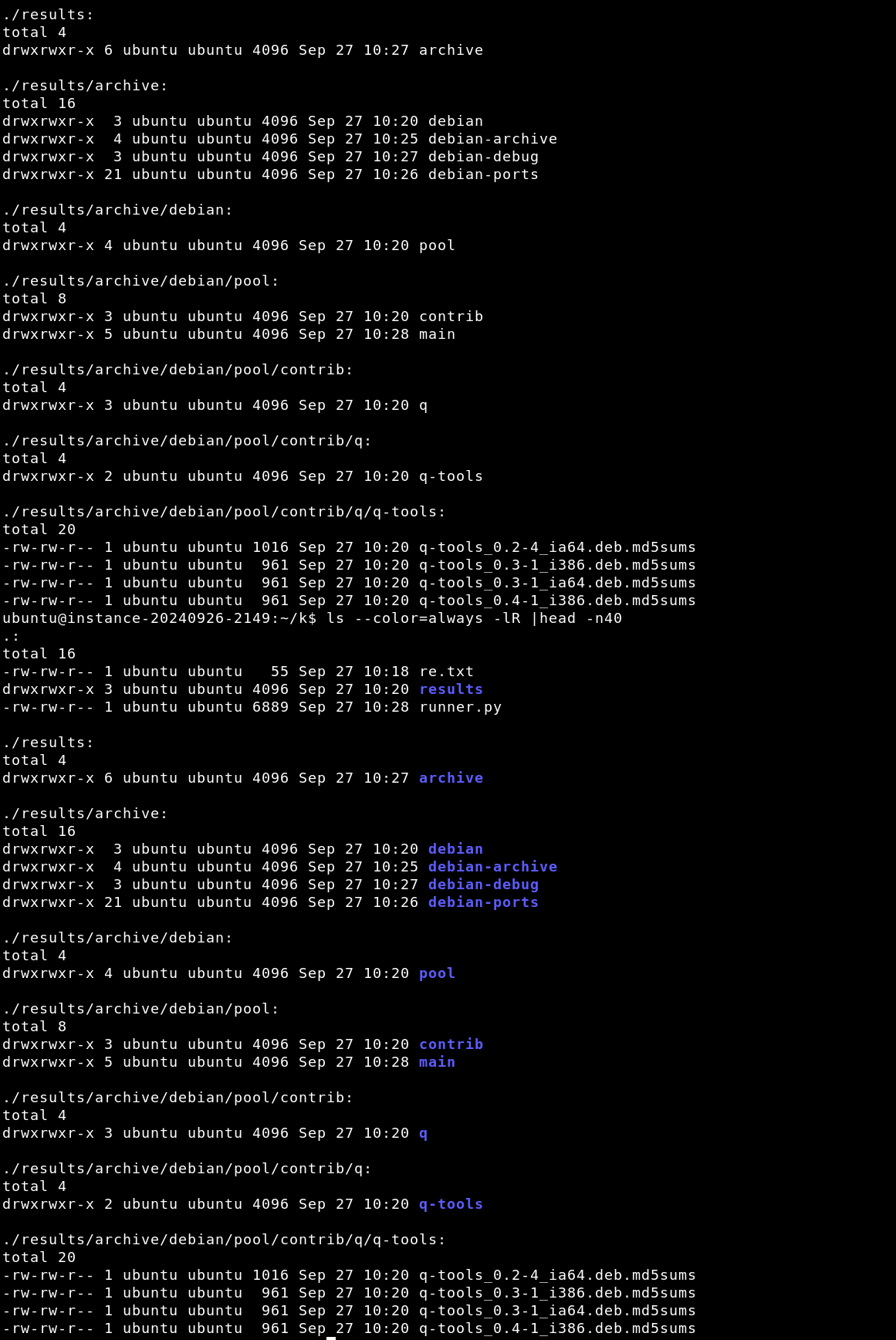
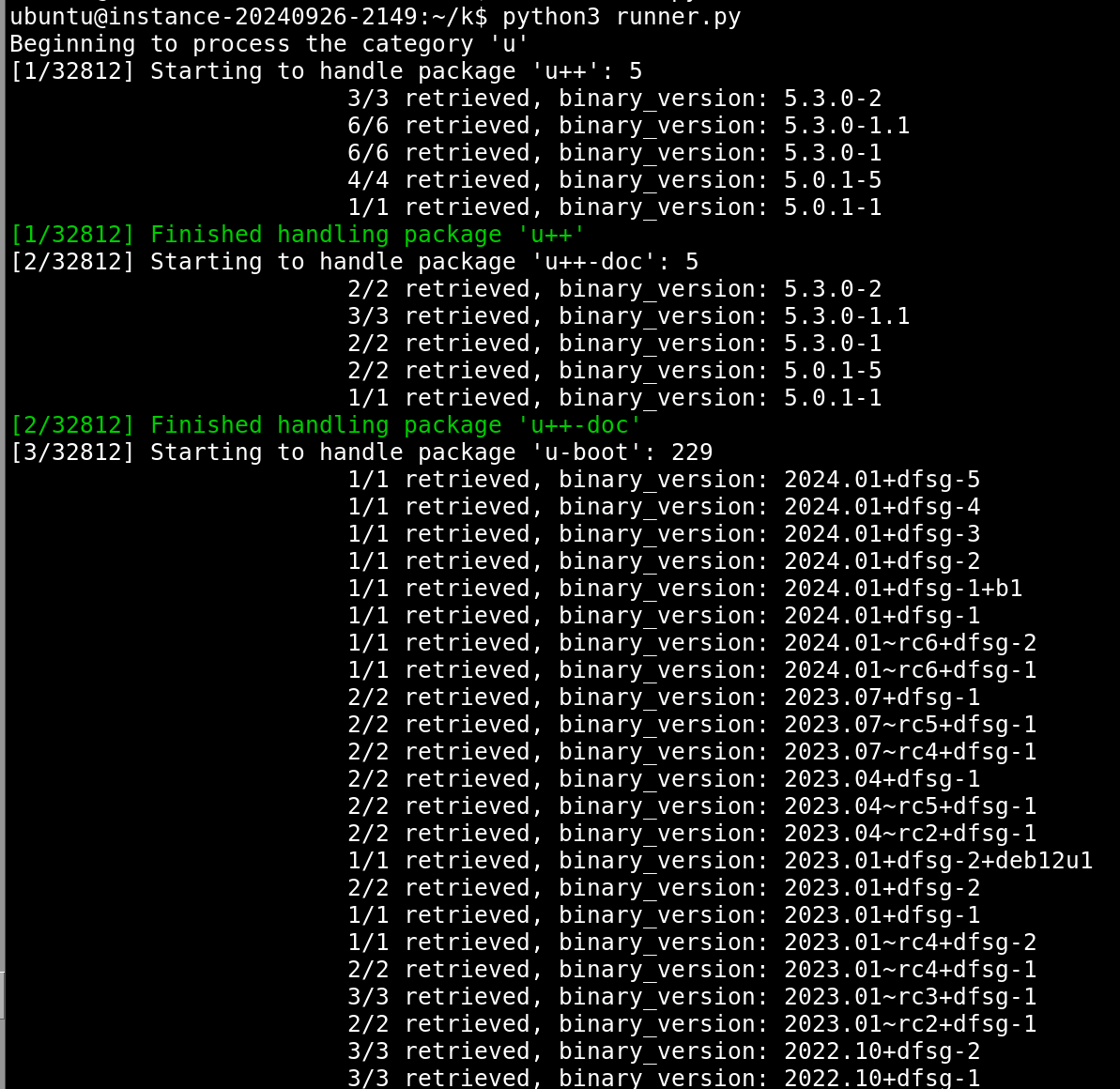 The `results/` folder looks like this:
 Many duplicate md5sums files can be found between archives, pools, and architectures, and a better system will collate those somehow instead of just saving them all. For example from `fdupes(1)`:
```
results/archive/debian-ports/pool-alpha/main/w/w-scan/w-scan_20141122-1_alpha.deb.md5sums
results/archive/debian-ports/obsolete/2016-11-05/w-scan_20141122-1_alpha.deb.md5sums
results/archive/debian/pool/main/q/q2-fragment-insertion/q2-fragment-insertion_2023.7.0-1_arm64.deb.md5sums
results/archive/debian/pool/main/q/q2-fragment-insertion/q2-fragment-insertion_2023.7.0-1_mips64el.deb.md5sums
results/archive/debian/pool/main/q/q2-fragment-insertion/q2-fragment-insertion_2023.7.0-1_amd64.deb.md5sums
results/archive/debian/pool/main/q/q2-fragment-insertion/q2-fragment-insertion_2023.7.0-1_ppc64el.deb.md5sums
results/archive/debian/pool/main/q/q2-fragment-insertion/q2-fragment-insertion_2023.7.0-1_riscv64.deb.md5sums
```
Since the Flask app is multi-threaded, we can also run `runner.py` concurrently a couple (dozen) times.
I should have made `runner.py` multi-threaded too, but never did it.
## Conclusion
---
All in all, this project was more of a way to work on more Python code. In reality, a better solution would be to contact the snapshot administrators and ask if they could export these md5sums files somehow -- no aggressive, unwanted, and IMO "rude" mirroring necessary. It was also a nice way to learn about the `.deb` format, and have fun with IPv6 and broken ratelimiting.
This project focused mainly on Debian's archive, but it is also possible to download a full archive of Ubuntu's packages, too. From [this Reddit thread](https://www.reddit.com/r/Ubuntu/comments/y0fsgr/is_there_an_unofficial_archive_of_all_released/), you can visit the package you're looking for on launchpad.net, and look at its full history. For example for the `hello(1)` package, [https://launchpad.net/ubuntu/+source/hello/+publishinghistory](https://launchpad.net/ubuntu/+source/hello/+publishinghistory). Builds from back to 2006 for `hello(1)` are available: [https://launchpad.net/ubuntu/+source/hello/2.1.1-4/+build/69518](https://launchpad.net/ubuntu/+source/hello/2.1.1-4/+build/69518), so Iimagine builds for everything are available for the whole history of Ubuntu.
The source code for this project can be found here: [https://github.com/MegaManSec/md5sums](https://github.com/MegaManSec/md5sums).
Many duplicate md5sums files can be found between archives, pools, and architectures, and a better system will collate those somehow instead of just saving them all. For example from `fdupes(1)`:
```
results/archive/debian-ports/pool-alpha/main/w/w-scan/w-scan_20141122-1_alpha.deb.md5sums
results/archive/debian-ports/obsolete/2016-11-05/w-scan_20141122-1_alpha.deb.md5sums
results/archive/debian/pool/main/q/q2-fragment-insertion/q2-fragment-insertion_2023.7.0-1_arm64.deb.md5sums
results/archive/debian/pool/main/q/q2-fragment-insertion/q2-fragment-insertion_2023.7.0-1_mips64el.deb.md5sums
results/archive/debian/pool/main/q/q2-fragment-insertion/q2-fragment-insertion_2023.7.0-1_amd64.deb.md5sums
results/archive/debian/pool/main/q/q2-fragment-insertion/q2-fragment-insertion_2023.7.0-1_ppc64el.deb.md5sums
results/archive/debian/pool/main/q/q2-fragment-insertion/q2-fragment-insertion_2023.7.0-1_riscv64.deb.md5sums
```
Since the Flask app is multi-threaded, we can also run `runner.py` concurrently a couple (dozen) times.
I should have made `runner.py` multi-threaded too, but never did it.
## Conclusion
---
All in all, this project was more of a way to work on more Python code. In reality, a better solution would be to contact the snapshot administrators and ask if they could export these md5sums files somehow -- no aggressive, unwanted, and IMO "rude" mirroring necessary. It was also a nice way to learn about the `.deb` format, and have fun with IPv6 and broken ratelimiting.
This project focused mainly on Debian's archive, but it is also possible to download a full archive of Ubuntu's packages, too. From [this Reddit thread](https://www.reddit.com/r/Ubuntu/comments/y0fsgr/is_there_an_unofficial_archive_of_all_released/), you can visit the package you're looking for on launchpad.net, and look at its full history. For example for the `hello(1)` package, [https://launchpad.net/ubuntu/+source/hello/+publishinghistory](https://launchpad.net/ubuntu/+source/hello/+publishinghistory). Builds from back to 2006 for `hello(1)` are available: [https://launchpad.net/ubuntu/+source/hello/2.1.1-4/+build/69518](https://launchpad.net/ubuntu/+source/hello/2.1.1-4/+build/69518), so Iimagine builds for everything are available for the whole history of Ubuntu.
The source code for this project can be found here: [https://github.com/MegaManSec/md5sums](https://github.com/MegaManSec/md5sums).